meierzwo
-
Posts
101 -
Joined
-
Last visited
-
Days Won
5
Content Type
Profiles
Forums
Latest X-Plane & Community News
Events
Downloads
Store
Everything posted by meierzwo
-
Could be a Timing Problem if you switch them very fast nearly in the same second. I had this sometimes on my now retired old and outdated Gaming PC. But not with the new one.
-
I checked multiple Times. I got the Sound on Ground and also later in Flight. Also if I switch them on for the first Time in Flight. But only when switching them ON. No Sound on OFF. But the Sound is not the loudest. With Engine and Prop Sounds on a high Level, it's easy to overhear them.
-
Still little Information. Which xp12 Version? Beta? RC? Pedals direct to the PC or via USB-Hub (Passive or Powered one). Any Logitech Drivers installed? They are not needed IMHO. If you have that Problem again, open the Joystick Configuration Page for the Pedals and check, if you see the Movement there and the Hardware is recognized by the SIM. If the Hardware is recognized but the Action is not send through the Plane, the Plane or a Subsystem is not loaded correctly. There could be a hint in the Log.txt, so you should post it here or in the xplane.org Forum. As I wrote, I had this sometimes with early Versions of xp12. Hardware was recognized by the SIM but not in the Plane. But this was gone with later xp Beta and RC Versions.
-
And if you have any leftover Mixture Settings from a previous Joystick Profile, delete them. Or you could have Troubles with the Engine Startup Sequence. For the Throttle Lever Liftoff for changing between Alpha and Beta Section, I use a Button on the Alpha Yoke. The MU2 has a TOGA Switch and I don't want to loose that Function. Personal Preference. Edit. For a Pilots Handbook look here:
-
Hmm, strange. What SIM Version are you using? Rudder Hardware and how they are connected to the PC? It sounds like the SIM Version could be the culprit. Any Hints in the Log.txt? In earlier Versions of the XPlane 12 Beta, I noticed sometimes strange Reactions or Responses from my Flight Controls when changing Planes. Like a Profile or Subsystem was not loaded correctly. Add-ons or Plugins could also be a Troublemaker.
-
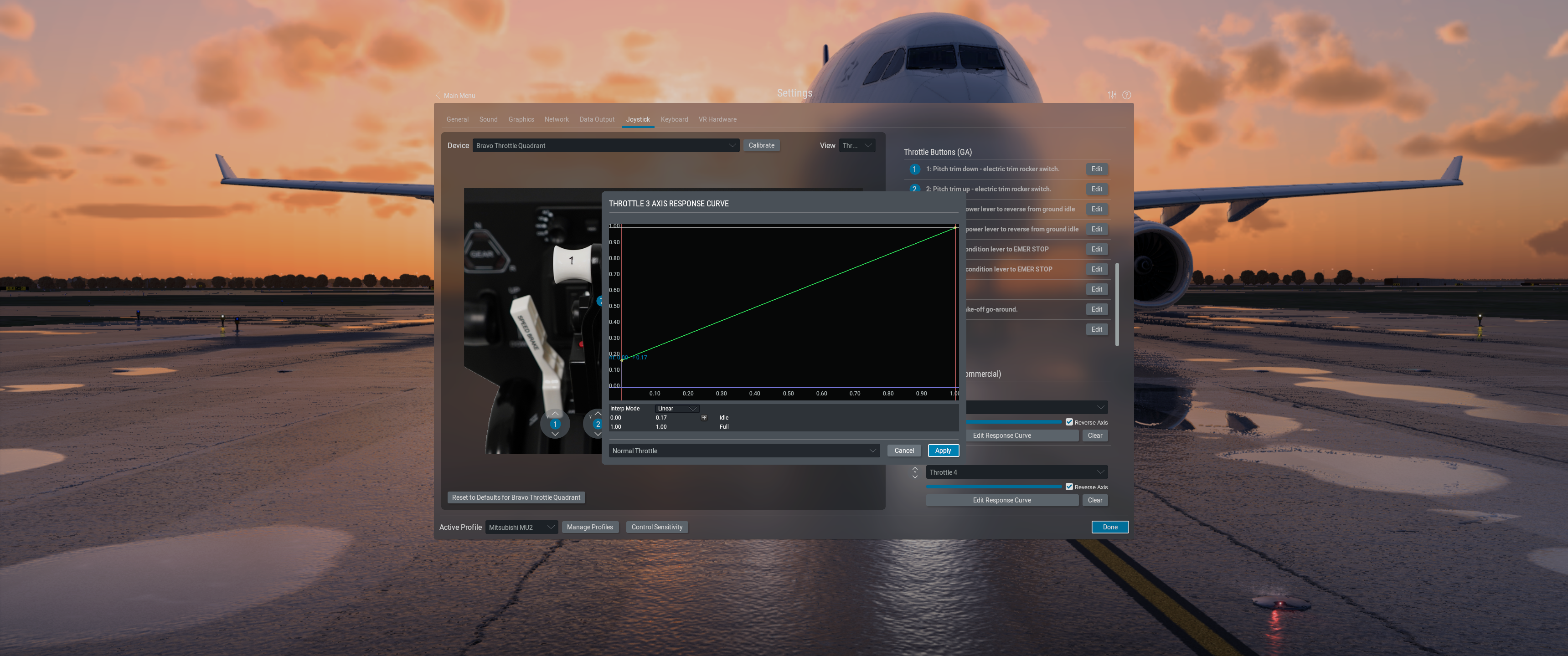
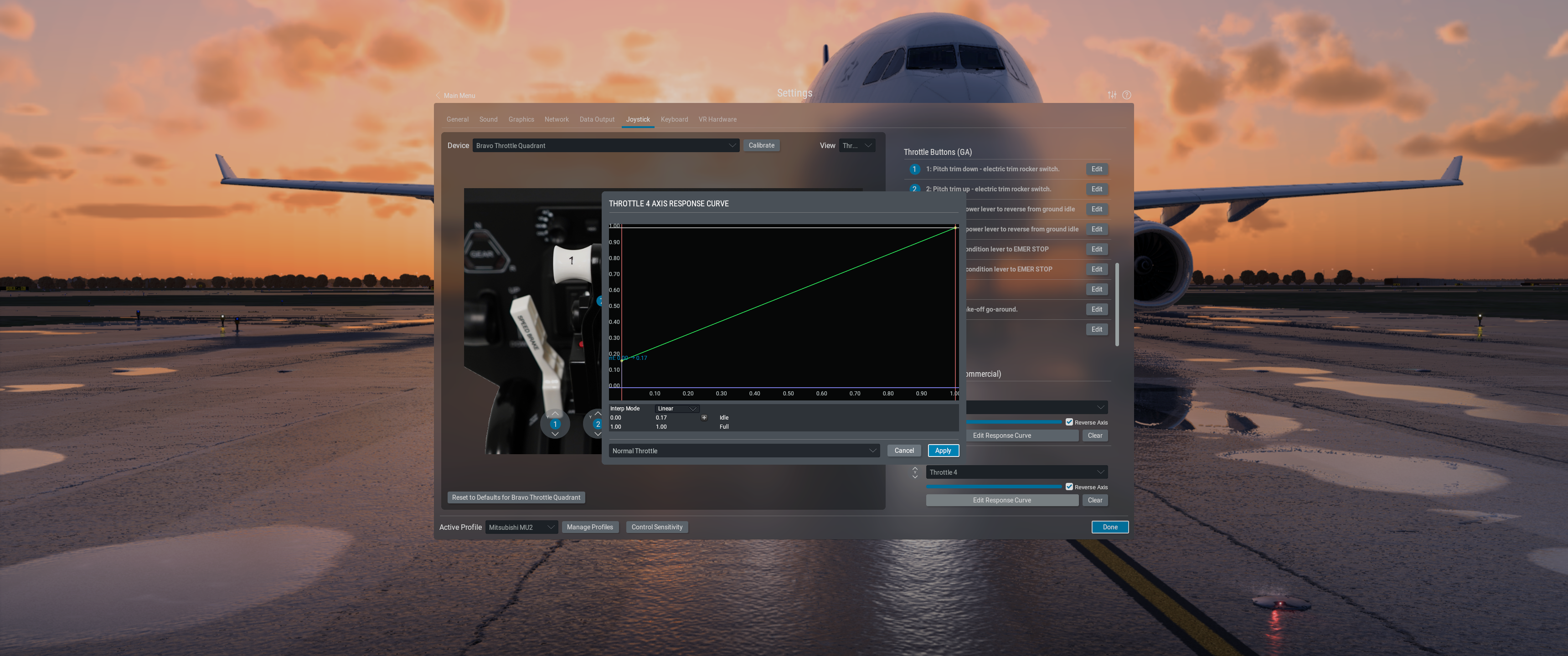
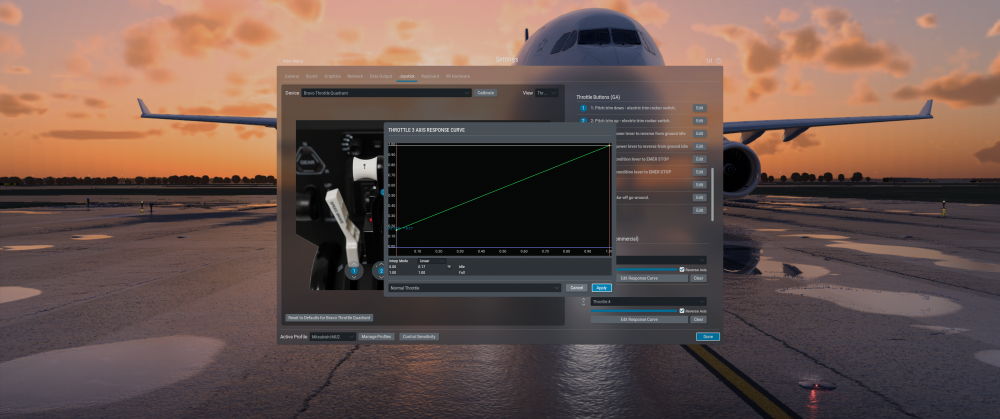
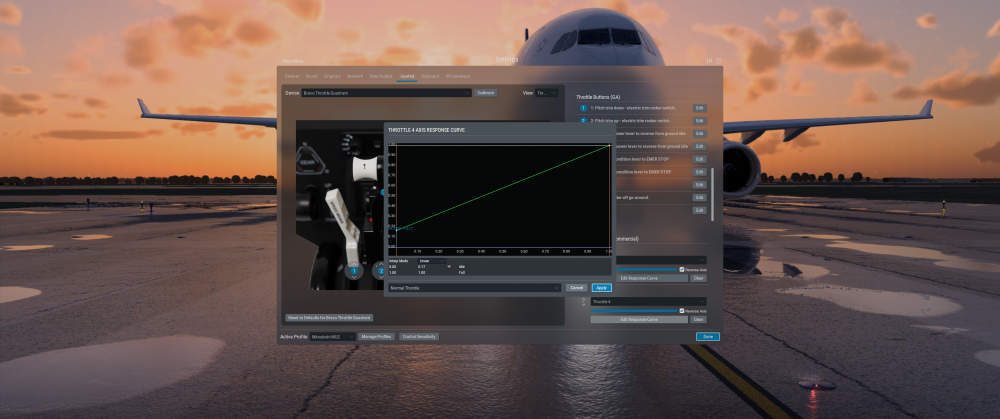
The MU2 is not a Plug and Play Plane. It's one of those, you HAVE to read the Documentation for a Proper Setup. I also use the Honeycomb Controls and the configuration could be a challenge, but everything could be configured. Start with a new Joystick Profile, take care of using Throttle 3 and 4 for Lever 1 and 2 on the Bravo, and don't forget to edit the Throttle Response Curves as described in the Manual. For the Alpha Switches, I only use the Light Switches. Have in Mind, the MU2 has some own DataRefs. And have a look in the Forum here. Some Questions maybe already answered. You will find Settings for the MU2 Preference (Gizmo Plugin) here, I posted mine a few Days ago. Pre Defined Joystick Files will not help in any case. There are a few Settings which are based on Personal Preferences so it is better to do it Step by Step. And as a End Result, you know what you are doing. Feel free to ask if something is unclear. I'm still learning too.
-
Cant get ghost throttles to show up
meierzwo replied to pocketsand's topic in Mitsubishi Marquise MU-2 v2
The second Series was my Answer to the Original Poster. I do not have Problems with the Ghost Throttle. Worked perfect for me. The OP did not respond yet if his Problem is solved. -
Cant get ghost throttles to show up
meierzwo replied to pocketsand's topic in Mitsubishi Marquise MU-2 v2
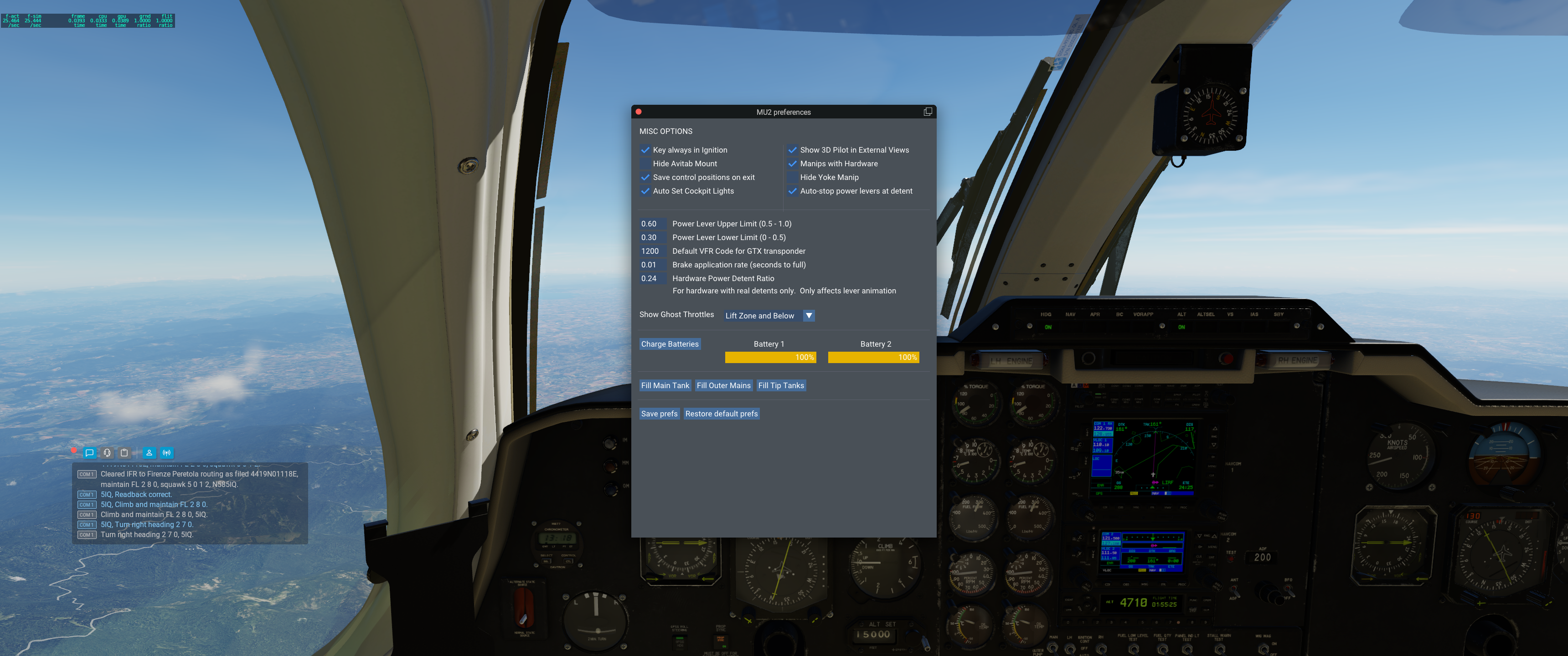
Don't know if it will help but these are my Settings with the Bravo Throttle Quadrant. Preference and Throttle Response Curves.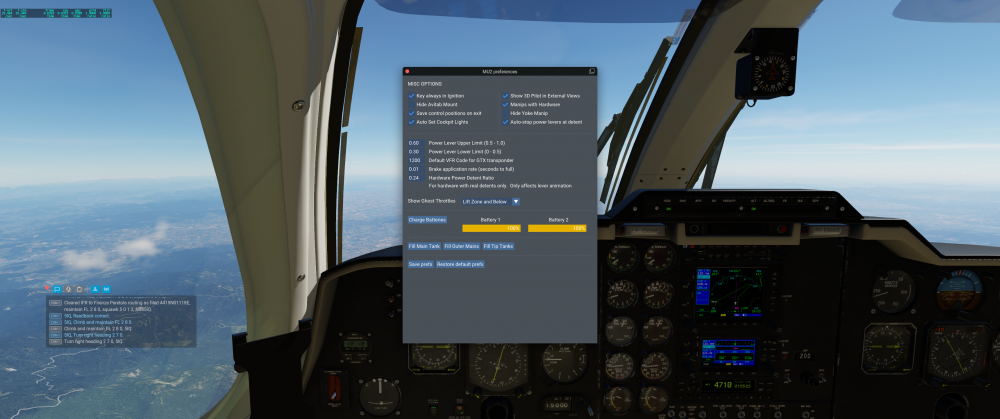
-
TOGA Simulation MU-2 Marquise v2.1.0 Update Released!
meierzwo replied to Cameron's topic in Mitsubishi Marquise MU-2 v2
I removed the Plugin but there is no difference. I also tried the Stock Laminar 172 with the G500 Plugin for a crosscheck if the Plugin causes that Error. But no Error with the 172 and the Plugin. It's only the MU2, with or without the G500 Plugin. The Plane is still functional. Log.txt -
TOGA Simulation MU-2 Marquise v2.1.0 Update Released!
meierzwo replied to Cameron's topic in Mitsubishi Marquise MU-2 v2
XPlane 12.06b6 The MU-2 or the old Gizmo Plugin is flooding the Log with this Error: E/GFX/Bridge: Encountered OpenGL error GL_INVALID_OPERATION Only the MU-2 does this, no Errors with Stock Laminar or other Third Party Planes. Here is a answer from the Laminar Forum: https://forums.x-plane.org/index.php?/forums/topic/292842-1206b6-is-available/&do=findComment&comment=2596327 Looks like there is some work to do. Log.txt -
I do not often a ILS Approach but often, the fist Attempt did not work. The Second one is a success. Flight Plan is set (Airways, no GPS), following the ATC Instructions for Waypoints, Altitude, AP is in HDG and ALT Mode, LOC Freq is set, CDI is set to VNAV, LOC-ID is captured. On the last ATC Call - Report on Localizer- I switch the AP to Approach. Both CAP Lights go Green, Plane follows the Glide Path but instead of Lining Up to the Runway for the last 3 or 5 Degrees, it goes 90 Degrees of to the Right or Left and stays on that Course. But still tries to follow the Glide Path until the Localizer is lost. ATC cancels my Approach and sent me back into Pattern for a second Try. Flying the same Route, doing the same Things at the same Time and this Time, the ILS Approach was a success. I had this with two Airports now. One was a uncontrolled one (no Tower or Approach Freq - Unicom - but with ILS) and I was lined up with the Runway on the Path. View was blocked from some Clouds so i switched to APR Mode. And off it goes. CAP Lights green. The second try on this Airfield did work as expected. Second one was with a controlled Airport. ATC guided. What causes the Plane to go 90 Degrees off Course with both Cap Lights green? And working Glide Path. I want to understand what happens here because the second Attempt with no difference in Actions did work.
-
TOGA Simulation MU-2 Marquise v2.1.0 Update Released!
meierzwo replied to Cameron's topic in Mitsubishi Marquise MU-2 v2
There is a small Switch on the upper right side of the Frame. I did a quick and dirty Video. -
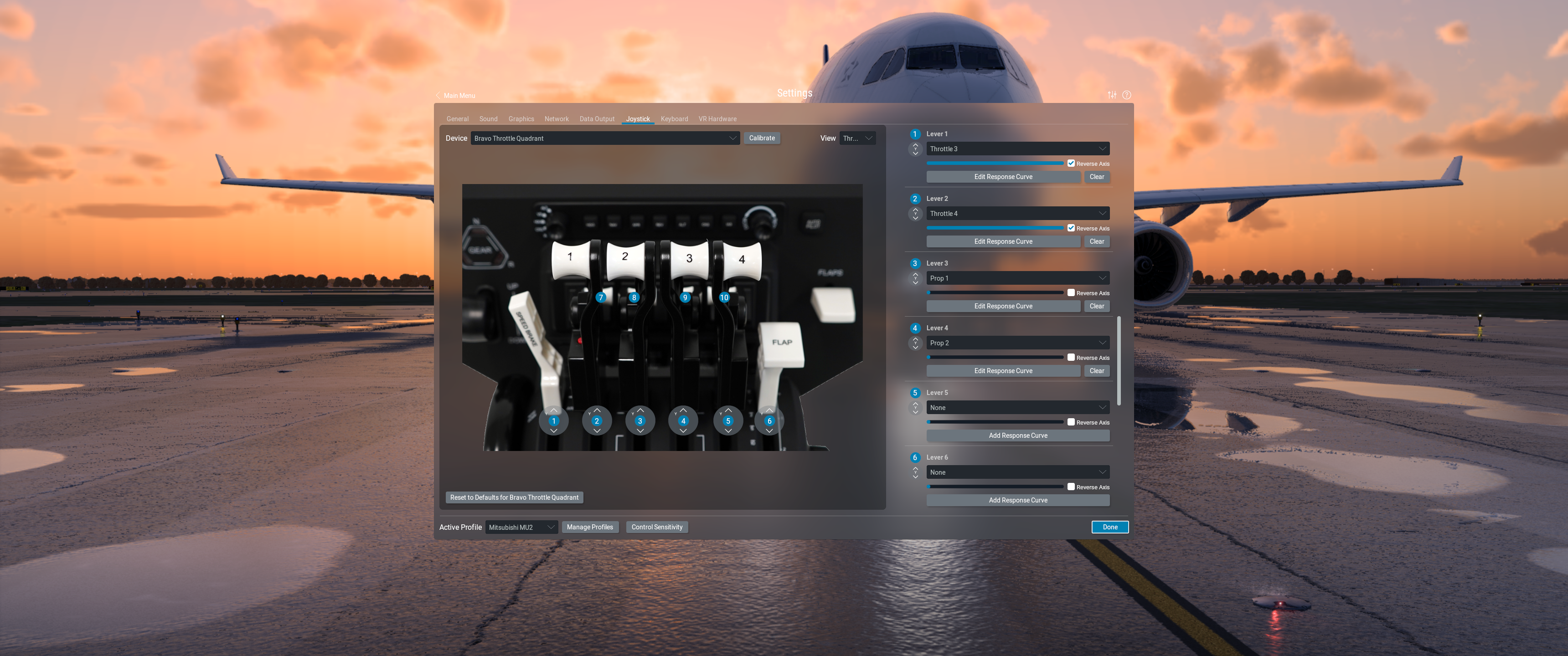
The Bravo has 6 Levers. A normal Setup for 2 Engines (Piston or Turboprop) is 2 for Throttle (Black), 2 for Prop (Blue) and 2 for Mixture/Condition (Red). Some Turboprops use all 6 Levers, some not. The MU-2 uses Throttle Levers, assigned to Throttle 3 and 4 Axis, and Prop Levers, assigned to the Prop Axis. The Mixture/Condition Levers are unused and should not assigned to any Function. In Hardware, you can unplug the Levers and use the included Covers to close the Gaps. If you copy a previous Setup for the MU-2 without deleting the Mixture Setting, it could cause in Problems with non starting Engines. I had this with Rotax Engines too. The confusing Part is, it happens not every Time and not for all Engines. This is my Bravo Hardware Setup for the MU-2. Black Levers Throttle, Blue Levers Prop. And the Assignments in XPlane.


-
TOGA Simulation MU-2 Marquise v2.1.0 Update Released!
meierzwo replied to Cameron's topic in Mitsubishi Marquise MU-2 v2
My Training Pattern is the "Round the World Trip" they made with this Plane some Years ago. My first Starts were bad and it took a while to get them smooth. My Landings are still a bit bumpy. -
And if you have any Mixture Settings in your Joystick Configuration, delete them for this Plane.
-
Maybe this helps?
-
It did not work on my Installation. Installation was done as described in the Instructions but the Plane failed to work with it. Errors about snd Files, Re-Registration needed and no Interactive Cockpit. I had a copy from the Plane, so a rollback was no Problem. Looks like I have to wait until the Gizmo Plugin is ready and the MU-2 Installer makes use of it.
-
After a Sim Crash I was looking over the Log Text and found same Warnings/Errors. The Gizmo Plugin is rather old (from2021) and is calling wrong Datarefs: [Gizmo64]: Dataref 'sim/cockpit2/controls/flap_ratio' has been replaced. Please use the new name. [Gizmo64]: Dataref 'sim/weather/turbulence[0]' has been replaced. Please use the new name. [Gizmo64]: Dataref 'sim/weather/turbulence[1]' has been replaced. Please use the new name. [Gizmo64]: Dataref 'sim/weather/turbulence[2]' has been replaced. Please use the new name. [Gizmo64]: Dataref 'sim/weather/temperature_ambient_c' has been replaced. Please use the new name. Is there no newer one, ready for XP12 and how does this effect the Mu-2? For the Mu-2 I found this in the Log: 0:00:12.191 W/TEX: PNG warning loading Aircraft/X-Aviation/Mitsubishi MU-2 Marquise v2/objects/VAR_Cockpits_NML.png: Duplicate iCCP chunk 0:00:12.191 W/TEX: PNG warning loading Aircraft/X-Aviation/Mitsubishi MU-2 Marquise v2/objects/VAR_Cockpits_NML.png: Duplicate iCCP chunk 0:00:12.191 I/FMOD: Master bank Aircraft/X-Aviation/Mitsubishi MU-2 Marquise v2/fmod/ Sample rate: 48000 speaker mode: 3 (2 speakers) 0:00:12.191 W/ACF: Aircraft/X-Aviation/Mitsubishi MU-2 Marquise v2/fmod/xsMU2B60_4B_GNS.snd:182: 0:00:12.191 W/ACF: Sound attachment marked to work with AI aircraft but sim/cockpit and sim/flightmodel datarefs only work for the user's aircraft. 0:00:12.191 W/SCN: Aircraft/X-Aviation/Mitsubishi MU-2 Marquise v2/fmod/xsMU2B60_4B_GNS.snd:267: 0:00:12.191 W/SCN: Sound attachment marked to work with AI aircraft but sim/cockpit and sim/flightmodel datarefs only work for the user's aircraft. 0:00:12.191 E/SOUN: Warning: unknown line (copilot RMI Nav2) 0:00:12.191 E/SOUN: Warning: unknown line END_SOUND_ATTACHMEN 0:00:12.191 E/SOUN: Warning: unknown line BEGIN_SOUND_ATTACHMENT 0:00:12.191 I/SND: This aircraft is using FMOD in FULL mode. 0:00:12.191 E/SOUN: snd error in file: Aircraft/X-Aviation/Mitsubishi MU-2 Marquise v2/fmod/xsMU2B60_4B_GNS.snd line 1243 0:00:12.191 E/SOUN: Param name sim/flightmodel2/gear/tire_rotation_speed_rad_sec[*] is missing a valid index in the sound file. 0:00:51.615 G64: core: Livery Changed: Name:() Folder:(Aircraft/X-Aviation/Mitsubishi MU-2 Marquise v2/) 0:00:12.191 W/TEX: Aircraft/X-Aviation/Mitsubishi MU-2 Marquise v2/objects/Interiors/Interior_2_NML.dds compressed texture used as material source 0:00:12.191 W/TEX: PNG warning loading Aircraft/X-Aviation/Mitsubishi MU-2 Marquise v2/objects/VAR_Cockpits_NML.png: Duplicate iCCP chunk 0:00:12.191 W/TEX: PNG warning loading Aircraft/X-Aviation/Mitsubishi MU-2 Marquise v2/objects/VAR_Cockpits_NML.png: Duplicate iCCP chunk
-
My Custom Views via numpad are saved. I made them once and only have to type the Number on the Keypad for the View. But only for one Bird. The Views will be saved, when you change the Plane or end XP. What I'm searching for is copying the once saved Views to another Version of this Plane. Making them new in every Version is no Fun. And you will never get the same Views in every Plane.
-
I second that. It replaced my Twin Otter in the Hangar as my new Favorite. And for now, I enjoy it at the 25 Days Around the World Trip.
-
Digging out this old Thread. The Blog is Offline since a while and only available on Internet Archives. If anyone want to try this Journey, I made a list of (hopefully) all Departure and Arrival Airports. For the Flights itself, I use Simbrief Flight Planing. Aorund the World.csv
-
We have Screen Pop Ups for both Garmin Devices but not for the Transponder, is that correct? Would be nice to have a Pop Up for this Device too. And one Question to this two little yellow Handles on the Throttle Quadrant, left over the Trim Wheel and on the right Side nearby the Trim Indicator. They are animated but not described in the Manual. What are they for? Heinz-Juergen
-
TOGA Simulation MU-2 Marquise v2.1.0 Update Released!
meierzwo replied to Cameron's topic in Mitsubishi Marquise MU-2 v2
What a Beauty. And what a Challenge to manage it. I purchased it this Morning and need the whole Day until now before my first Flight with it. Okay, ATC was mad about me but no Crash. And still enough to read and learn about this Aircraft. I like it. Heinz-Juergen -
I think it's only the Animation. Now in the Air, the response on Trim is very sensitive. No need for Acceleration. So I declare it as "Solved". :-)
-
As a new Owner, I have this Issue too. I can start the right Engine but not the left one. No Difference in Startup Sequences or Button Settings. Fuel Flow but no Ignition and the the Engine won't start. Master Caution goes on and the "L SRL Fail" appears. Ignition Cont Switches are set to Auto. I sometimes have this Issue with other Planes too. And one thing. It's a Turbo Prop, so Mixture Levers should have no Effect. From my copied Bravo Profile, the Mixture Levers were still set with Mixture Control and Fuel Cut Off with the Detent Switch. It HAS a Effect. I was not in Fuel Cut Off but going from Rich to Low Mixture cuts off the running Engine. I deleted all Bindings for that but the left Engine will still not work. Hmm, someone sold me a broken Plane. Okay, after trying another Plane and reloading the MU-2, none of the Engines won't start. Restarting the SIM does the Job and I'm on my first flight. I also think there is a bug in XP12 with the Engine Types. Very nice Plane indeed.