Jump to content

Leaderboard

Popular Content

Showing content with the highest reputation since 01/27/2026 in Files

  1. Version 1.0.0

    9 downloads

    Disclaimer / Preface This livery is not 100% originally created by me. I redesigned and rearranged the decals on the fuselage, and all decals used were sourced from publicly available materials online. This livery was created purely out of my appreciation for the character and is shared online for non-commercial purposes. If this work infringes upon any rights, please feel free to contact me and I will remove it immediately. I really love Kipfel’s character design and felt that she deserved to be brought into the world of X-Plane, so I created this livery. I’m not particularly skilled at design, so there may be details that don’t appeal to everyone — I hope you don’t mind❤️ Kipfel (Japanese: キプフェル) is a catgirl virtual avatar designed for VRChat, created by the modeler かめ山 (kameyama) under their original 3D model circle 「もち山金魚」 (MOCHIYAMA KINGYO). Kipfel is a laid-back catgirl who loves eating fish-shaped cookies. Her name is derived from a pastry called Kipferl, a crescent-shaped baked good whose form resembles Kipfel’s tail.
    3 points
  2. Version 1.0.0

    1 download

    I made regional routes between 63 airports on United States. The 158 routes, charts of all the airfields, FMS flight plans, and support information, are on the RRR file. The description is on my YouTube channel (this page don't allow to embed the link. Search on YouTube: Rolo Bach Sim Flights)
    2 points
  3. Version 1.3

    21 downloads

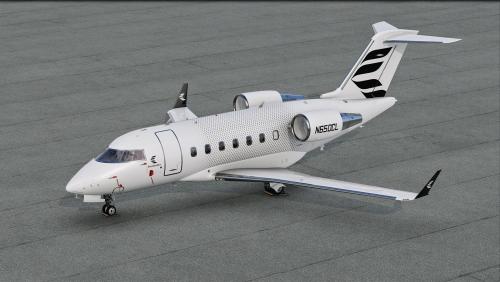
    This mod allows you to add pods on HotStart's Challenger. Some are fictional, some not. This is an early release, please do not hesitate if things are not working as it should. The readme file should be enough to install this properly. Are included: LocalEye (fictional) - the little sibling of the GlobalEye platform MVX - the pods used by Finnish Border Guard SLAR9000 - the pods used by Danish Air Force Artemis -the pods used by US Army Enjoy!
    1 point
  4. Version 1.0.0

    31 downloads

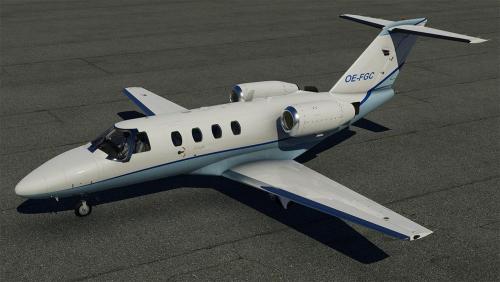
    This is an 8K-livery for the TorqueSim CJ525 To install, extract the zip file into the "liveries" folder. This also works without the winglets, the extra file just gets ignored. If you enjoy my work, consider supporting me on Patreon to cover some of the horrendous Adobe-costs ;).
    1 point
  5. Version 1.0.0

    11 downloads

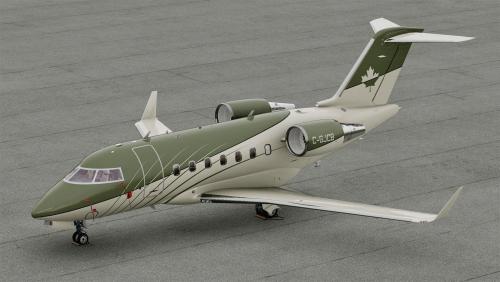
    A CAAC livery for CL650 by HotStart
    1 point
  6. Version 1.0.0

    11 downloads

    A fictional personal livery I made for the C525, based on the design and colors Alaska Airlines has on the winglets of its 737's. 8K resolution.
    1 point
  7. Version 1.0.0

    85 downloads

    Livery recreating N133GL, the first CitationJet ever delivered with MSN 525-0001, it is currently operated out of Little Rock (KLIT)
    1 point
  8. Version 1.0.0

    43 downloads

    Enjoy !
    1 point
  9. Version 1.0.0

    33 downloads

    Enjoy! Optional electronic pack: unfortunately, the mod is not publicly available currently. All the credits to his author.
    1 point
  10. Version 1.0.0

    44 downloads

    This is a livery for the TorqueSim CitationJet 525, based on YU-SCJ a Citation 525 owned by Prince Aviation. The Registration is baked, so its not possible to change the registration. To install simple extract the YU-SCJ 1.0.0.zip into the "liveries" folder. Enjoy!
    1 point
  11. Version 1.0.0

    49 downloads

    Enjoy !
    1 point
  12. Version (v2)

    510 downloads

    How to take command of this new aircraft as a complete beginner on the CL650 type ? All my compilations of forum notes that were very useful in the first hours ! March 2022 version.
    1 point
  13. Version 1.20b

    543 downloads

    ACF Mesh Tools for Linux, Windows and MacOsX ACF Mesh Tools allows you to edit and modify the plane's meshes from the ACF file. Be aware: those tools are not made to edit the OBJ8 files as they work only with the ACF file format. HOW ACF MESH TOOLS WORKS Let's take as example the default Laminar's Cessna 172, a great model very well done (aestetically and internally). We know that in Plane Maker the fuselage is made out of cross-sections: ...and those cross-sections creates a mesh: Those meshes, made out of cross-sections, are the ones that PlaneMaker uses as model for the plane and X-Plane uses for its physics calculations. Before v.8 that meshes were used as visual and physics model. Now, in most cases, this meshes are hidded from view and X-Planes uses a dedicated file, in OBJ8 proprietary format, for the visual rendering. Using the tool 'acf_mesh_extract', the meshes inside the ACF are saved in a standard Wavefront OBJ file, that can be edited with Blender or with any other software that supports the format. Once converted, the mesh can be modified: Then the edited mesh is converted back in ACF format, using 'acf_mesh_insert', and the resulting ACF file can be loaded in Plane Maker: Everything shown here was entirely done automatically with a conversion script. Except moving the points to alter the shape, no additional task has been done in Blender. I'm using Blender, but this method can be used with any 3D software. A PRACTICAL EXAMPLE This is a quick reshaping that I've done on the fuselage of B-377 Stratoscruser made by Kauffmann. I've found that the hidden fuselage doesn't match the shape of the plane model, the visual one, as we can see in Plane Maker and in the version imported in Blender: (the wireframe in black, the unselected one, is the OBJ8 mesh for this plane; the selected object is the fuselage mesh from the ACF file) After a quick reshaping, I've managed to make che ACF mesh match the shape of the OBJ8; then and I've reimported it back in the ACF file: Loading the resulting ACF file in PlaneMaker we see that the cross-sections have changed from this: to this: THE TOOLS In the zip file you'll get: acf_mesh_extract acf_mesh_insert Launch those commands without options to get an help page. acf_mesh_extract extracts all the meshes from the ACF file and converts them in a single (wavefront) OBJ file with multiple objects. You can import this file in any 3D software that supports the format, and alter the meshes as you wish. You can not delete or add points nor change in any way the topology; you are just limited to move points. You'll find that some objects, like the engine's nacelles, are not in their final position; that is because PM positions them with a translation value. You can not move those objects to their final positions, otherwise when you'll reimport them back in the ACF file, it won't work; You are allowed to delete objects that you don't need. Some objects, although they can be modified and reimported in the ACF file, once this one is opened in Plane Maker are reset to their original shape; this applies to those parts, such the wings, that are made out of airfoils. You can not alter the UV informations of the vertices, as they are used to store the ACF's topology informations and they are needed later to reinsert the meshes back in the original file. Make sure that your 3D sofware exports the UV informations, without altering them. acf_mesh_insert allows to reinsert the modified meshes back in the original ACF file. It can be used only with meshes converted with 'acf_mesh_extract'. You can not overwrite the original ACF file; this command will save the output in a different file. Your original ACF file is always preserved. Inserting the meshes does not alter in any way the informations of other parts present in the file. You don't need to reinsert all the meshes; you can insert only the ones you have modified. DEVELOPMENT This tools are under active development and their functionalities may change in the future. The primary development platform is Linux. Special thanks to @xraydelta1 for compiling the Mac version. Feedbacks, reports, suggestions or ideas are strongly welcomed: feel free to send me a message with your thoughts. X-Pilot's forum is the primary and sole forum for support, announcements and new releases. PLEASE DO NOT REDISTRIBUTE THIS TOOLS THROUGH OTHERS FORUMS OR PLATFORMS
    1 point
×
×
  • Create New...