All Activity
- Yesterday
-
 Freesocks joined the community
 -
 Pseudo_end joined the community
 -
No, the dev doesn’t give dates.
-
I've isolated the problem to a conflict involving the TDS Garmins and the Pilot2ATC plugin P2A_XPLink. I can fly the C525 with the Garmins and the P2ATC plugin removed, or with the UNS only and P2A_XPLink running, but not both together.
-
 JohnsFallenOut joined the community
 -
Do we have any idea when that 'time' will arrive?
-
 Nooa joined the community
 -
EI-IRF AFL KingAir 350 View File This is a livery for the Airfoillabs KingAir 350. To install, extract the zip file into the "liveries" folder. If you enjoy my work, consider supporting me on Patreon to cover some of the horrendous Adobe-costs ;). You can find 8K versions of most of the liveries there. Submitter pilotdeviation Submitted 12/09/2025 Category General Aviation
-

Version 1.0.0
2 downloads
This is a livery for the Airfoillabs KingAir 350. To install, extract the zip file into the "liveries" folder. If you enjoy my work, consider supporting me on Patreon to cover some of the horrendous Adobe-costs ;). You can find 8K versions of most of the liveries there. -
 pledg3 joined the community
 -
 nlrails joined the community
 -
 7uni3r joined the community
 -

dc-3 V2 crash xplane at startup - sound plugin problem
zphil replied to zphil's topic in Douglas DC-3 v2
I solved the problem. I had to start Xplane with another aircraft and register. It now works. -
I am glad to hear that you got it working! And thanks for reporting back.
-
 shivarolex joined the community
 -
I checked it again in flight - it works. I must have been careless
-
This might be down to the lack of GPSS (which only comes from the FMS input, IIRC).
- Last week
-
@androsvandorx and @UncontrolledAirSpace At last, others seeing this problem I was beginning to wonder whether I was a unique moaner!!! I started to prepare a bug report for Laminar, but am not in a position, currently, to provide them with an ideal report / log.txt. I'll do it, probably around Christmas time. In the meantime, if either or both of you, can beat me to it with the bug report, it would be great. It's really odd that even GPS1 can't show identifiers, radials or distances because GPS2 is also a 530. I could maybe rationalize that GPS2 might not work properly for some reason with this bug, but for everything not to work is surprising.
-
 lugopilot joined the community
 -
 Aleks joined the community
 -
I'm making my own airplane model for the xp11 simulator. When I go to check it, I see that the camera isn't working, the keyboard shortcuts aren't working, and the cockpit itself isn't working. Apparently, the script isn't running. Can you please tell me what to do?
-
I'm making my own airplane model for the xp11 simulator. When I go to check it, I see that the camera isn't working, the keyboard shortcuts aren't working, and the cockpit itself isn't working. Apparently, the script isn't running. Can you please tell me what to do?
-
dc-3 V2 crash xplane at startup - sound plugin problem
zphil replied to zphil's topic in Douglas DC-3 v2
forgot to append the DC3 log file ! DC3.log -
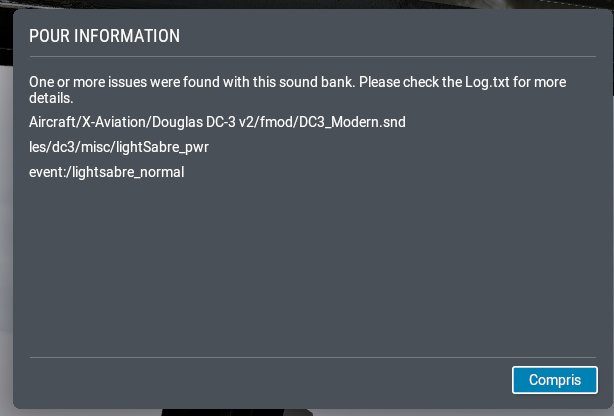
Hello, after installing LES Douglas DC-3 v2 (DC3 2.0.3) with the installer, xplane 12 crashed after showing this message : I attached the log.txt file for help. Thanks for your help ! Log.txt
-
I just acquired both the Torquesim Citation 525 and the SR-22. I'm unable to fly either when equipped with the TDS Garmins, as the sim (XP 12.3.2) is intermittently going into a hard freeze (shows unresponsive in Windows, spinning circle etc)...these prolonged freezes last around 2-5 minutes, and then the sim comes out of the freeze and flies normally, usually just for a few minutes before repeating the problem. The only way I've been able to complete a flight with the 525 is configured with just the UNS. The Cirrus exhibits the same freezing, so the common denominator of the dual TDS Garmins leads me to suspect some sort of integration issue. There's nothing unusual in the log before or after the freeze, and there's no crash report since the sim does eventually recover each time. These two add-ons are the only ones I've used with dual GTNs active. Is there a simple way to go to a single configuration, e.g. turn off or disable the second unit? I'm running Win 11 25H2 on a fairly strong system--13900KS + 4090, not overclocked. C525 is version 1.0.3, TDS gauge is 1.0.0.7. I can fly the Hotstart Challenger and FF 767 for hours with no issues on the same machine. There's no obvious system performance issue--I ran HWInfo monitored remotely from another machine and during the freezes there is no spike in temps or CPU/GPU load, and there's plenty of available RAM/VRAM. I do not have the RXP plugin installed. Any ideas on how to troubleshoot further would be appreciated.
-
You have to run the installer executable.
-
I downloaded the Challenger Hotstart 650, extracted in the main X-Plane folder, restarted X-Plane and it does not show in the available aircraft.
-
In flight it should work! Let me know if it does not for you, we will troubleshoot together then.
-
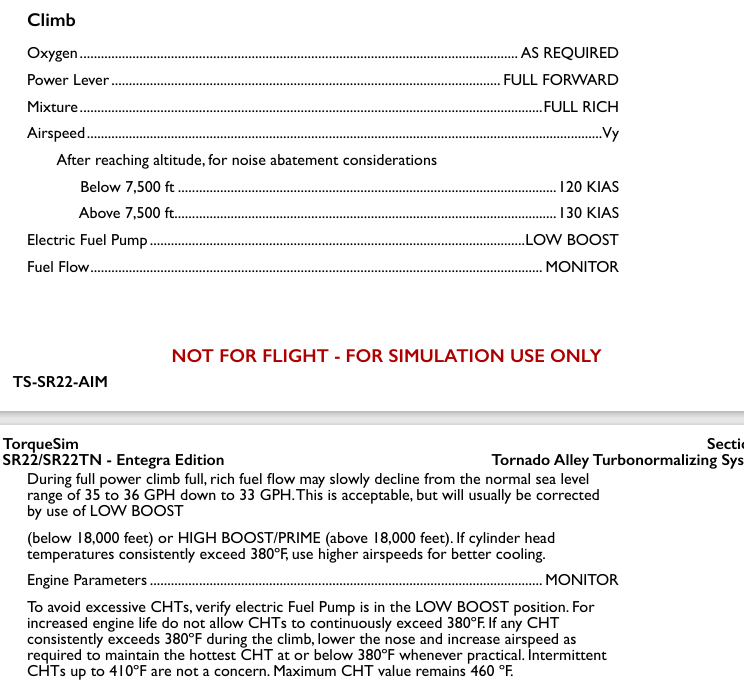
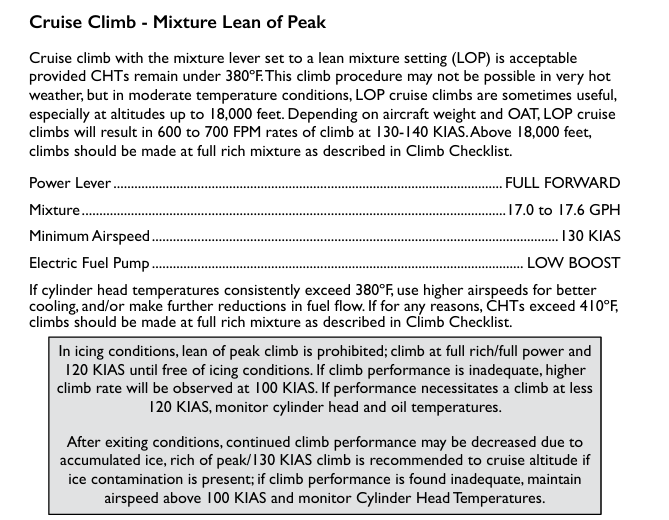
Hello guys, I've been trying to fly the Entegra SR22. They are wonderful models and, having flown one time in real life in one, I can see the amount of work put into them. I am following the AFM procedure for takeoff and climb on the SR22TN but I keep getting two cylinders go bad on my flights. I've kept the engine running according to the manual (full power/mixture for TO and climb, and LOP for cuise, boost pump on) with no success. Any thoughts?
-
Thanks for the clarification.
-
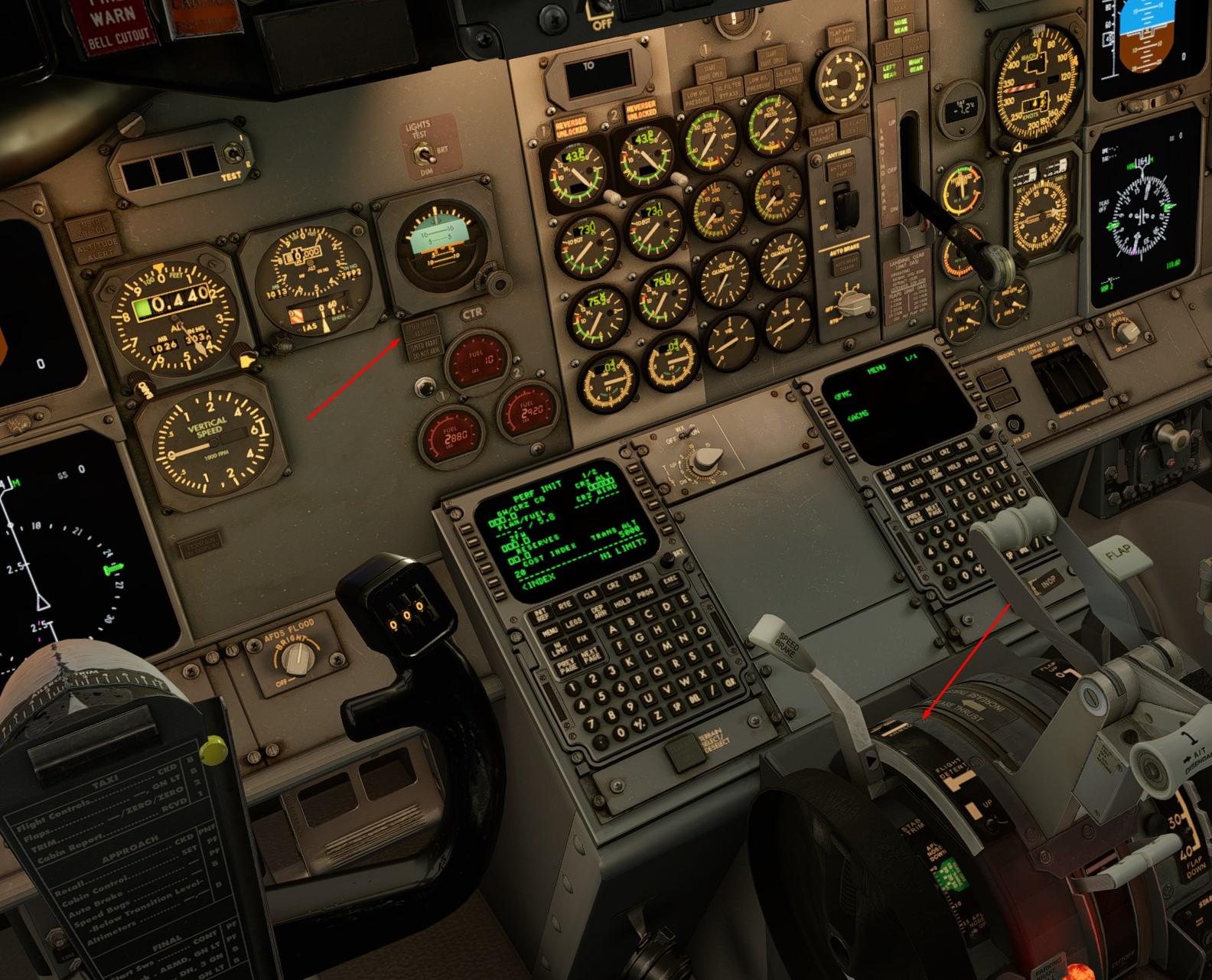
Thank you, I'm trying exactly this way I assigned the button to "Speedbrakes toggle between arm/disarm". But it was to no avail. This screenshot was taken on the ground as an example. But the problem also manifested itself in flight. We'll try the recommended one on our next flight.
-
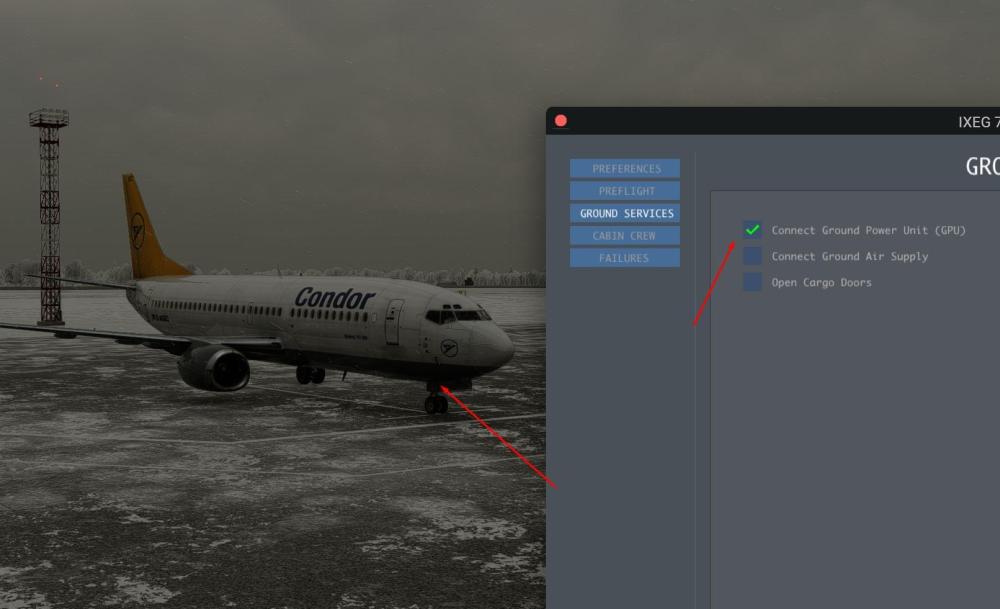
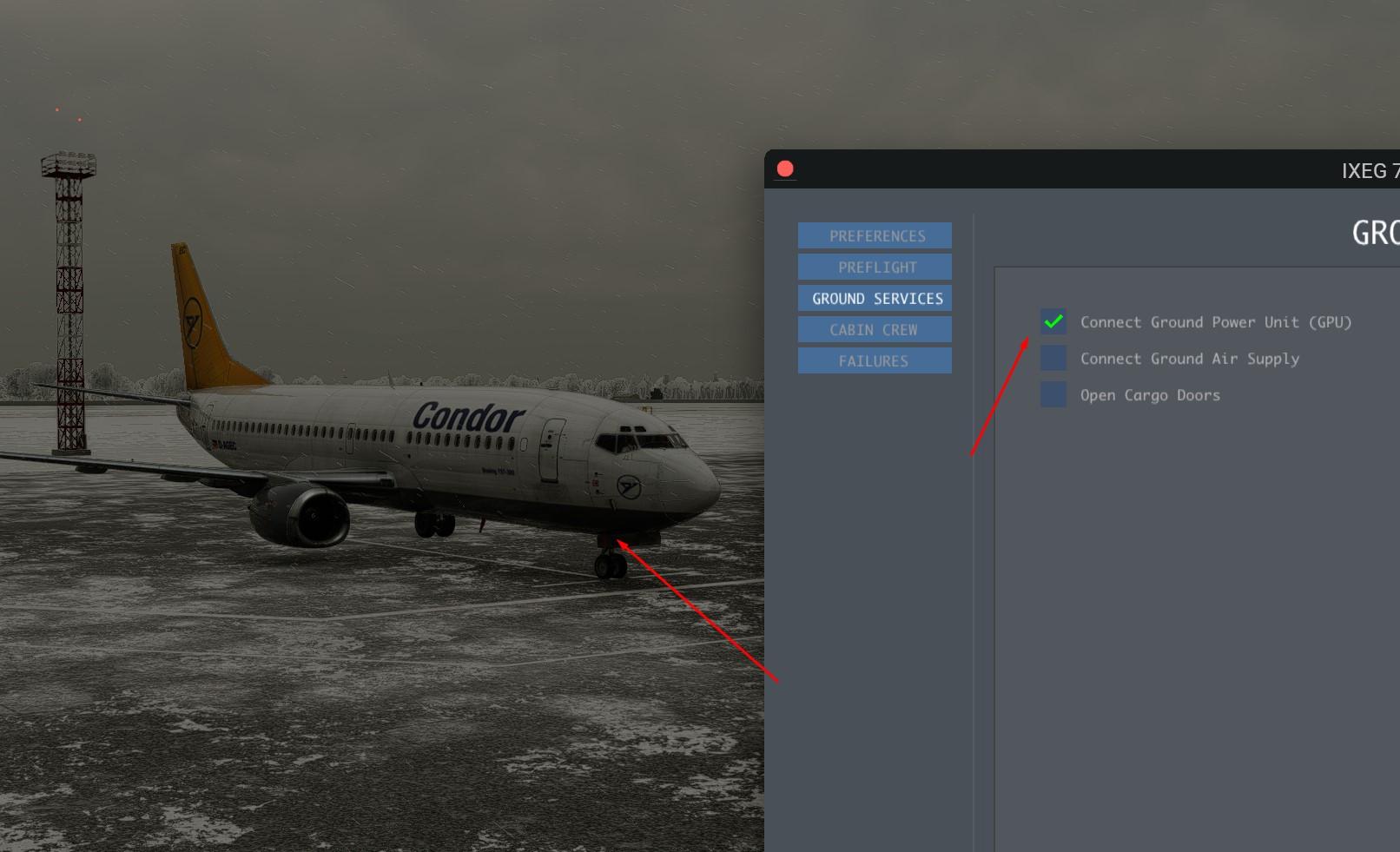
That is correct - we have removed the GPU cart object because it would clash with the "dynamic" GPU cart that X-Plane provides now (at many airports). In addition, a lot of airports have ground power that comes either "out of the ground" or "from the jetway", so seeing a GPU cart is not always appropriate. Laminar has further tweaked their GPU functionality in recent months - but we feel that it is not always perfect (i.e. they won´t allow GPU while the plane is on the runway because that is "not realistic" - which is nonsense, of course, because in theory nothing would preclude the GPU to enter the runway and plug in). So for now we will simply "turn on the GPU" when you use that option, if you want to role-play it, you can also call up the "ground services" window (shift-g is the default key) and call up a GPU cart to make it look nicer.
-
Try to assign a button to "extend speedbrake one notch" and then try again - even in the real 737 the positioning of the lever is "finicky" and it is easy to misplace it and either not arm the speedbrake or actually start extending it. And of course you are not trying to arm the speedbrake while on the ground, are you?
-
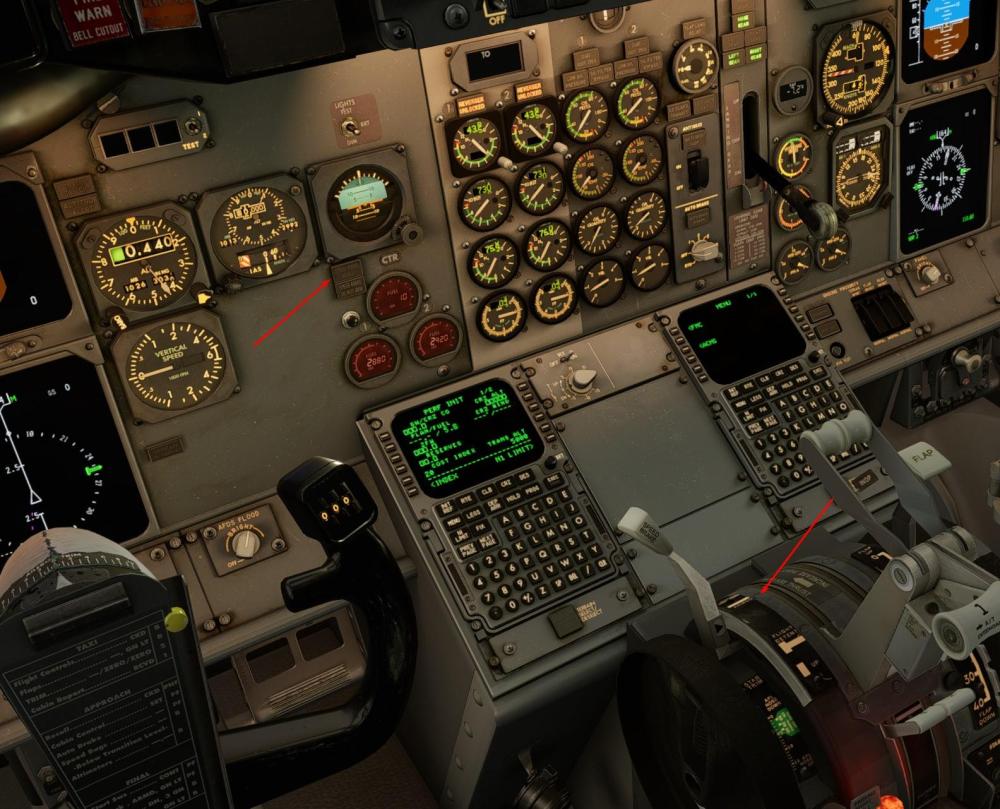
The SPEED BRAKE is not arming when the handle is set to the ARM position
-
When connecting the GPU, it is not displayed, only the socket cover is open