


JohnMAXX
-
Posts
1,607 -
Joined
-
Last visited
-
Days Won
76
Content Type
Profiles
Forums
Latest X-Plane & Community News
Events
Downloads
Store
Posts posted by JohnMAXX
-
-
The link is back up, sorry for that...
-
I'll keep you posted apparently it got deleted somehow.....
-
Nobody is infringing on your thoughts here, just offering up theirs which is contrary.....
-
-
-
I dont think that is necessary in order for it to work......I would contact FSGRW directly for conformation
-
Thats an XP Beta id start by reporting it to LR....
-
Skymaxx is a complete weather engine so any textures used with the default clouds wont work because we turn off the defaults....
And yes you configure ASXP the same way....
-
It may work, but i think you'll potentially run into some graphics annomolies...It couldnt hurt to try...
V4 was developed for the changes in xp11
-
1 hour ago, PilotGav said:
Cameron, people in the TBM community are going really sick of your smart ass replies and attitude.
Sent from my Pixel 3 XL using Tapatalk
I see nothing "smartass" about his comment, and you're attempted rallying cry for the "TBM Community" is very sad.....
Some personal advice, try being more positive instead of trying to head up a witch trial.....
Admittedly the high road is much more difficult but the rewards are also greater....,
-
Aerosoft has been TerraMaxx friendly in the past
 hopefully they get it sorted soon...
-
I'm pretty sure LR isn't using ortho and that's ortho in each shot, id make sure you uninstalled them properly and reboot the sim.....
-
Hello community,
If you use VR and want to participate in a beta program contact Cameron here on the forums....
We need beta testers and our current crop haven't gotten involved....
If you're not a VR user please flood Cameron's inbox with beta requests anyway.....
We need motivated people to get involved with this fantastic update.....
-
 1
1
-
-
Chris I remember when you had this issue before......Im doing well BTW

Few things,
Being that it came back up points to a hardware issue.......As a hardware guy, medical device repair, I run into graphical errors often on our standardized workstations, its very unlikely a software issue would pop up like this....
If there was an issue on our end , due to how MAC's are standardized, we would see this very often.......What I mean is your iMAC has several identical versions out there running X-Pane 11 with SMP that do not have this problem. Nor have I ever seen this on my MBP.....
As far as it only popping up with SMP, best guess would be SMP does something different than the core program that your GPU cant handle due to some sort of defect....
With all that I have been proven wrong before, life is a learning process, but Im really confident this is outside of SMP.....
-
Chris,
This is most definitely a GPU issue, try updating drivers or rolling them back........
Also be careful if you are overclocking......If you are, try running XP normally
-
You can try and contact the developer to see if they are interested in updating the package to work with TM....
Or, and you'll have to be careful, you can edit out the updated airport grass textures in the library.txt for that scenery package....
Deleting the lines that reference those textures will keep them from enabling.....
OR OR, you may be able to edit your scenery file so TM will override that scenery package...
-
24 minutes ago, Goran_M said:
Hot Start. (Not Hot Shot)

I think you're a Hot Shot Goran......my hot Shot!
-
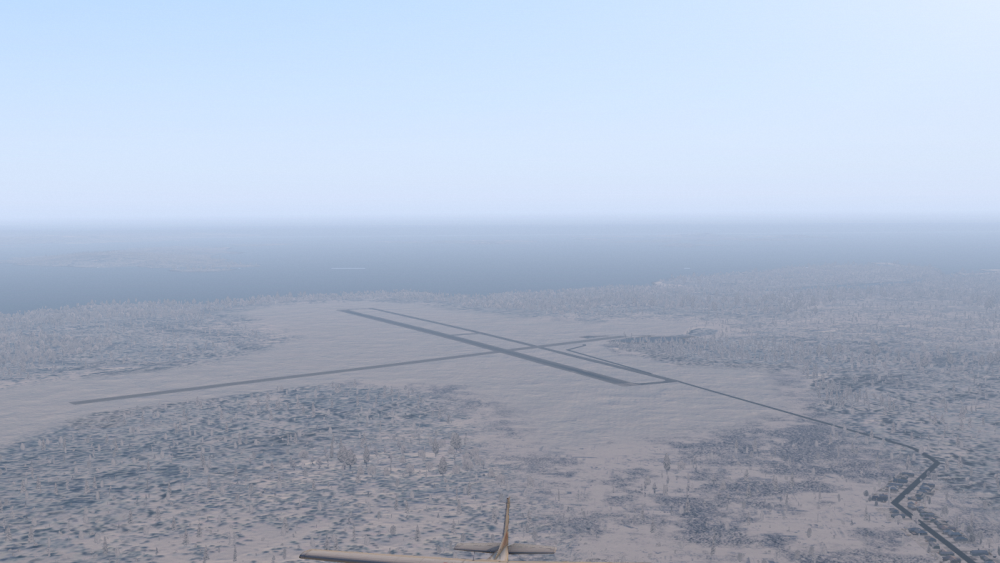
I checked out PANT and all seems fine is there any chance you are using any third party default airport enhancements?
PANT:
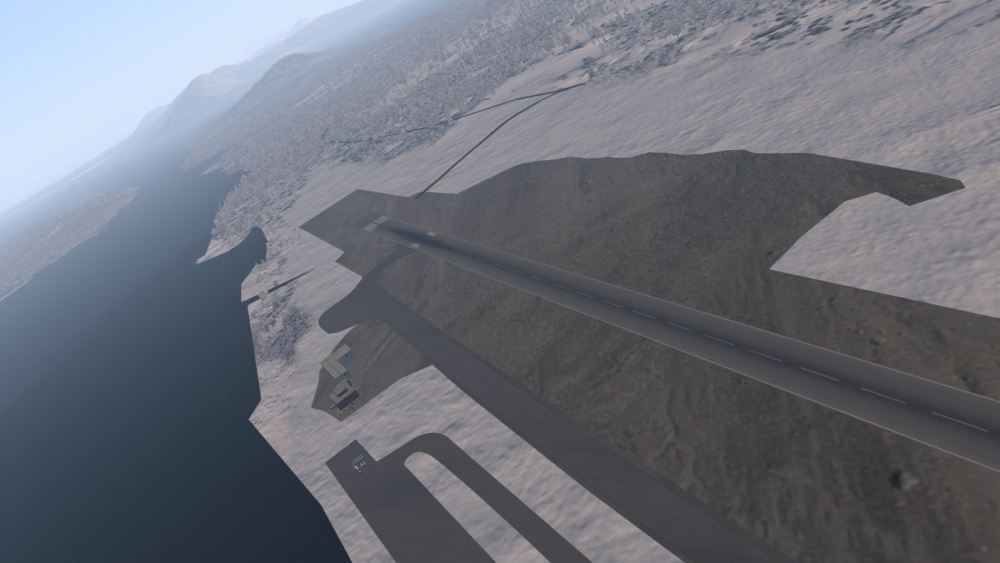
As far as PAKT is concerned it appears the author using the airport gateway decided to use what seems to be a rock texture versus the standard airport grass.....Not much we can do with this......
-
I'll have to look into this, it almost looks as if LR changed the default textures.....
-
41 minutes ago, divinglyc said:
It 's Off.. and it doesn't only happen in taking off, landing, also occurred during cruise... I can hardly level fly....
I have made a short clip showing this.. In this video, the wind is "0", AP/Trim On. AP/YD on, however, as you can see in this video, it was swinging right and left.
Sometimes, it's even much worse...
I'm no expert here but I'm curious have you tried upping your flight models in the xp11 settings?
I've seen this behavior before and that fixed it....
-
Beautiful! Thanks for sharing
-
1
-
-
Are you using any third party scripts? This may interfere with the look in certain situations....
-
-
Given you've posted once here to complain about this "broken product" instead of reaching out for support its safe to say you are full of it....
Stop trying to cloud up XP it's sad....
Of course if you are having an issue the guys here are more thsn willing to help....
-
 1
1
-
 1
1
-


2 Problems: the downloaded version is not 4.7.3 and cirrus are "framed"
in SkyMaxx Pro v4
Posted
I'll look into it, this is the first time I've seen this....
4.8 will have this fixed..