



Qwark
-
Posts
29 -
Joined
-
Last visited
Content Type
Profiles
Forums
Latest X-Plane & Community News
Events
Downloads
Store
Everything posted by Qwark
-
TOGA Simulation MU-2 Marquise v2.0.3 Update Released!
Qwark replied to Cameron's topic in Mitsubishi Marquise MU-2 v2
Haha, nice, that came through while I was authoring mine LOL. But is a separate thing from the panel size (the "Home"-Header on the GTN 650 is cut on their screenshots, too) I will go and catch some sleep now, its about 4 AM here in Germany. -
TOGA Simulation MU-2 Marquise v2.0.3 Update Released!
Qwark replied to Cameron's topic in Mitsubishi Marquise MU-2 v2
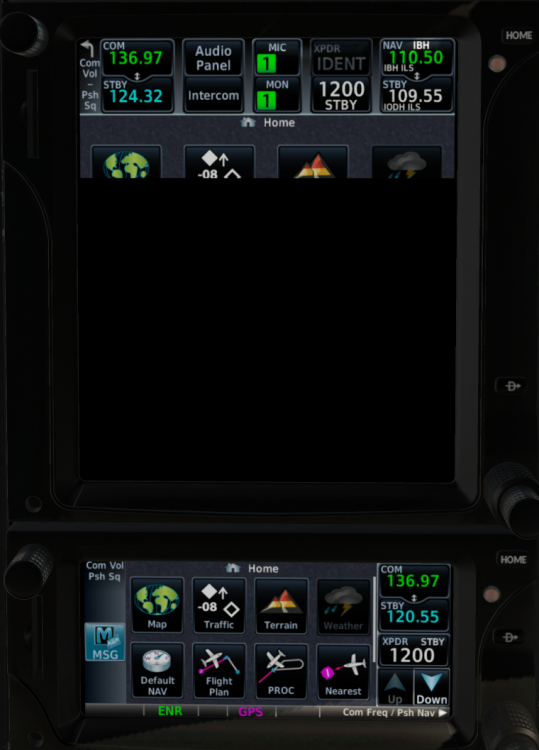
Hi again, Sorry to seem nitpicking... 1) The placement and size of the GTN panels within the 3D border is wrong / cuts content (see MU2_RXP_FRAMES_ORIG.png). IMHO changing the frame in RealityXP.GTN.ini to [GTN_750_1.PANELS] ... ; display position and dimension (left,top,width,height) ; frame.rect = 10,725,605,715 frame.rect = 16,715,592,700 and [GTN_650_2.PANELS] ... ; display position and dimension (left,top,width,height) ; frame.rect = 10,1005,605,270 frame.rect = 20,988,583,260 is better (see MU2_RXP_FRAMES_MOD.png). 2) The lower two thirds of the GTN 750 screen is black (no display showing, see images). So for the panel dimensions given above I could not validate the botton border 3) Why not activate... [GTN_750_1.PANELS] ... ; right mouse button on the screen toggles popup window if true (requires XP11.1). ; popright = false popright = true as is already done for the GTN 650? 4) After finally finding the "REALITY XP GTN Config" setting () I now have to set it on every load to "GTN 650/750" again. The setting seems to get saved (mu2b60_prefs.txt: rxpgtn_config_enum:4), but not (correctly) restored. Or perhaps simply a zero based versus one based oops? I will tell how much I like 2.0.3 soon as I get to FLYING it after all. It's too late in my corner of the world now... Best regards, and thanks again for 2.0.3 !!!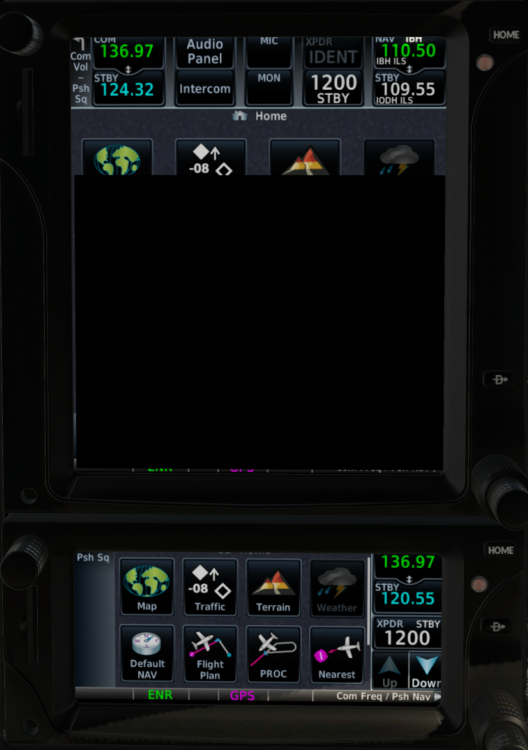
-
TOGA Simulation MU-2 Marquise v2.0.3 Update Released!
Qwark replied to Cameron's topic in Mitsubishi Marquise MU-2 v2
Great news! A (very) small first observation: The acf_version.txt says 2.0.3 (as to be expected), but the .acf files (xsMU2B60_4B_GLASS.acf etc.) all still contain "P acf/_version 2.0.2". Which obviously means they are displayed in XP with "2.0.2" on their tile for the A/C selection. Just did confuse me a bit at first -
Ground Power Unit connection problem.
Qwark replied to fleurenf's topic in Mitsubishi Marquise MU-2 v2
Hi all, just to confirm this issue, had the same (forgot about the GPU). But I did see it just in time (dragging the GPU with me while taxiing) and was stll able to dismiss it via Gizmo

