



cmbaviator
-
Posts
437 -
Joined
-
Last visited
-
Days Won
1
Content Type
Profiles
Forums
Latest X-Plane & Community News
Events
Downloads
Store
Posts posted by cmbaviator
-
-
Vatsim Window Data
View File
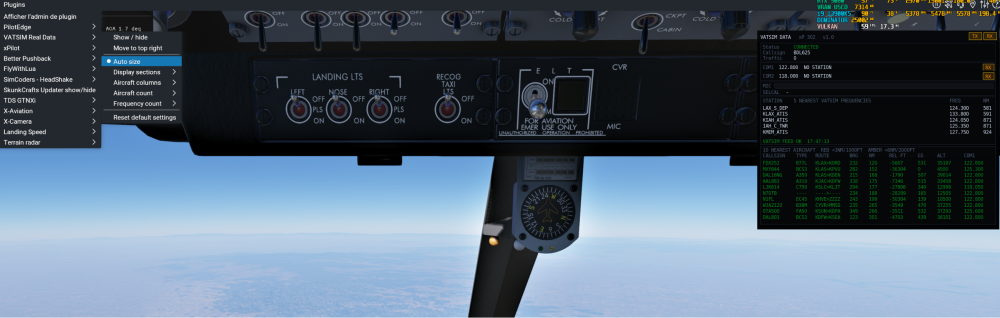
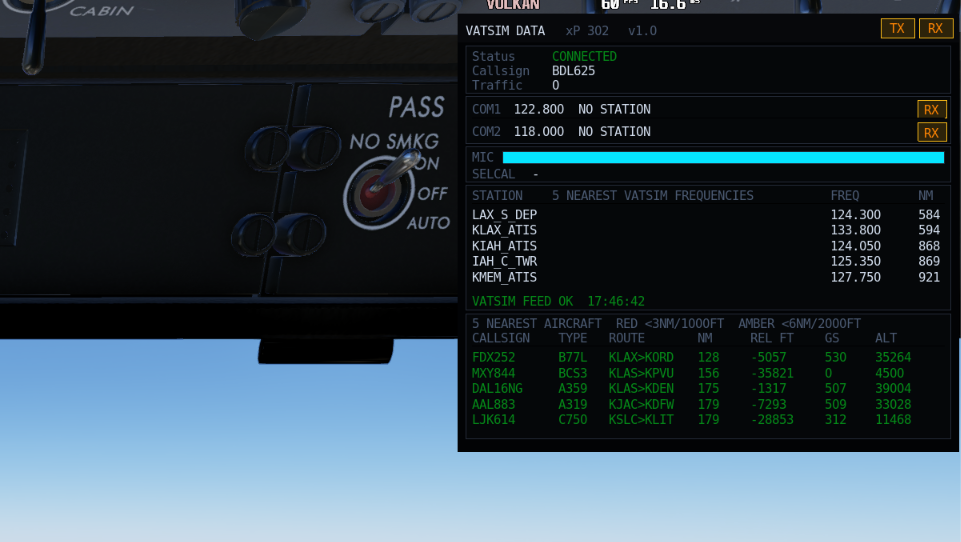
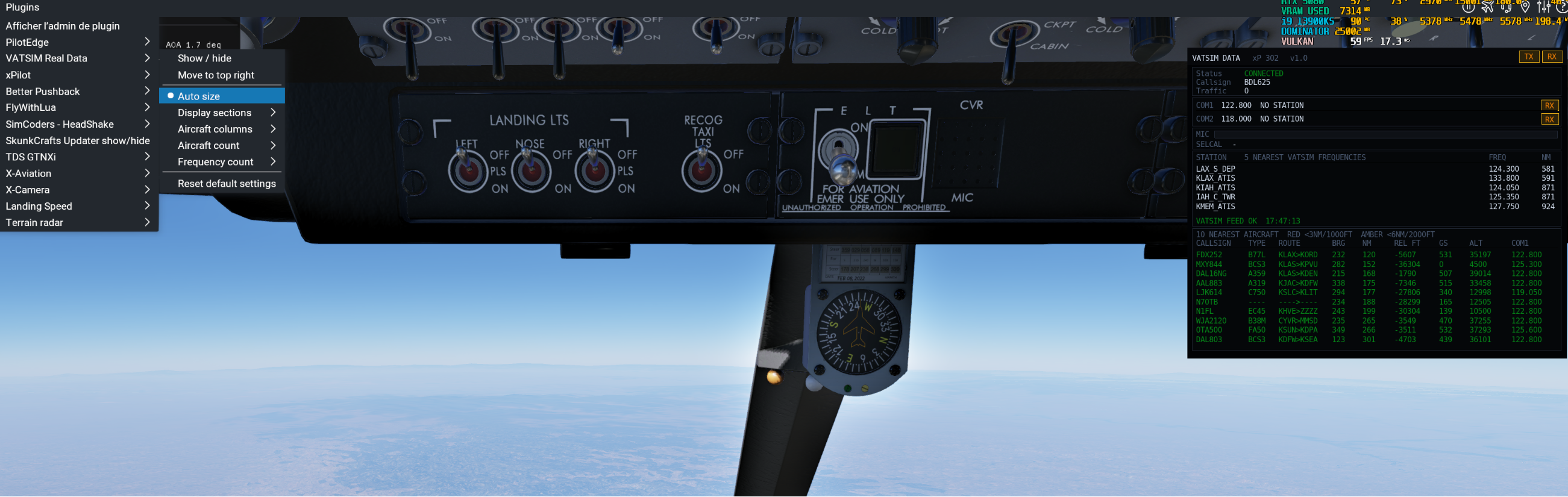
VATSIM Real Data v1.0 is a compact X-Plane 12 plugin that displays live VATSIM and xPilot information directly inside the simulator, including radio status, nearby frequencies and the 10 closest aircraft.
Full description
VATSIM Real Data v1.0 adds a compact, customizable VATSIM information window to X-Plane 12.
The plugin integrates with xPilot and displays your current connection status, callsign, nearby traffic, COM frequencies, microphone activity, SELCAL information and live VATSIM feed status.
It also shows the five nearest VATSIM ATC frequencies and the ten closest aircraft, with useful flight and proximity information presented in a single readable table.
Main features
- xPilot connection status and callsign
- TX and RX indicators
- COM1 and COM2 frequencies
- Active station callsigns
- Microphone level meter
- SELCAL status
- Five nearest VATSIM ATC frequencies
- Ten nearest VATSIM aircraft
- Aircraft callsign and type
- Departure and destination airports
- Bearing and horizontal distance
- Relative altitude
- Ground speed and altitude
- Reported COM1 frequency
- Automatic window resizing
- Fully configurable display from the X-Plane plugin menu
- Automatic settings saving
- Compact opaque interface designed for cockpit use
Traffic proximity colors
Nearby aircraft are color-coded using horizontal and vertical separation:
- Red: less than 3 NM and less than 1,000 ft vertical separation
- Amber: less than 6 NM and less than 2,000 ft vertical separation
- Green: all other traffic
This feature is intended as a situational-awareness aid only. It is not a certified TCAS system.
Customization
Display options can be changed directly from:
Plugins > VATSIM Real DataSections, aircraft columns, aircraft count and frequency count can be enabled or disabled without restarting X-Plane. The window automatically adjusts its size and saves the selected settings.
Installation
Copy the complete folder:
VatsimDataWindowinto:
X-Plane 12\Resources\plugins\The final structure should be:
X-Plane 12\Resources\plugins\VatsimDataWindow\64\win.xplRestart X-Plane after installation.
Requirements
- X-Plane 12
- Windows 64-bit
- xPilot
- Internet connection for live VATSIM data
Disclaimer
VATSIM Real Data is an independent community plugin. It is not affiliated with, endorsed by or officially supported by VATSIM, xPilot or Laminar Research.
-
Submitter
-
Submitted07/31/2026
-
Category
-
Landing Monitor and Flare Analysis : Xplane 12.4+ & FlywithLua NG
View File
Landing Monitor XP12 — Version 1.0
Advanced landing analysis for X-Plane 12
Landing Monitor XP12 is a FlyWithLua NG script designed to analyze every phase of a landing, from the final seconds of the approach to the runway rollout.
The script displays key flight parameters in real time, automatically detects touchdown and the runway in use, calculates a landing score, saves results to a CSV file, and generates a complete graphical analysis of the flare and rollout.
Main Features
Configurable real-time HUD
The compact HUD can display:
- total acceleration GTOT;
- GX, GY, and GZ acceleration components;
- maximum recorded acceleration values;
- IAS, TAS, and Ground Speed;
- pitch, roll, angle of attack, and crab angle;
- thrust, lift, weight, and effective drag;
- Lift/Weight and Thrust/Drag ratios;
- vertical speed and data from the latest landing.
Each item can be enabled or disabled individually from the Settings window.
Complete landing analysis
After touchdown, Landing Monitor calculates:
- landing rate in ft/min;
- vertical kinetic energy in joules and kilojoules;
- Peak G;
- pitch, roll, IAS, and angle of attack at touchdown;
- crab angle;
- bounce count;
- ground speed;
- wind, headwind, and crosswind;
- distance from the runway threshold to the touchdown point;
- lateral deviation from the runway centerline;
- heading and track errors;
- flare height, duration, and distance;
- final landing score and landing quality.
The runway is detected automatically from X-Plane’s
apt.datdata. The runway database is cached to improve startup time and can also be rebuilt manually from the Settings window.
Robust Flare Detection
Flare analysis begins below approximately 50 ft. The script records the final approach at 20 Hz, then analyzes the complete sequence after touchdown.
The beginning of the flare is defined as the first segment that meets all of the following conditions:
- longitudinal control input rises for at least 0.33 seconds;
- nose-up control input reaches at least 12.5%;
- total control-input increase is at least 3 percentage points;
- no significant control-input decrease occurs during the segment;
- aircraft pitch increases during the same period;
- total pitch increase is at least 0.10°.
Small tolerances are applied so that normal DataRef noise does not reject a valid flare. The average control-input slope is also calculated and displayed for reference.
Flare & Rollout Analysis Graphs
The analysis window displays five graphs:
- vertical speed;
- longitudinal joystick input;
- aircraft pitch;
- radio altitude;
- lateral deviation from the runway centerline.
The FLARE and TOUCHDOWN markers make it easy to visualize the exact timing of the landing sequence.
The first four graphs cover the period from 50 ft radio altitude to two seconds after touchdown. The rollout graph starts at touchdown and continues until 30 kt or until a rapid runway exit is detected.
Lateral deviation values remain in actual metres in all text, calculations, scoring, and CSV output. Only the visual amplitude of the plotted curve is reduced to make the graph easier to read.
Automatic Opening After Landing
Once the landing result has been finalized, the result and analysis windows remain ready in memory.
When the aircraft is on the ground and the parking brake reaches at least 50%, Landing Monitor automatically opens:
- the landing result and score window;
- the Flare & Rollout Analysis window.
This automatic opening occurs only once per landing. Both windows can still be reopened manually from the FlyWithLua menu. The script reads two parking-brake DataRefs to improve compatibility with different aircraft.
Landing Score
Each landing receives a score between 0 and 100.
The score starts at 100 points, then penalties are applied for:
- runway-centerline deviation;
- flare-to-touchdown distance;
- crab angle;
- Peak G;
- landing rate.
The scoring system is designed to reward overall landing technique and runway alignment, rather than focusing only on achieving the lowest possible touchdown rate.
Settings
The Landing Monitor Settings window allows you to:
- choose which real-time parameters are displayed in the HUD;
- choose which landing results are shown;
- select the CSV separator: comma, semicolon, or tab;
- view the runway database status;
- manually rebuild the runway database;
- select a predefined HUD position;
- use custom screen coordinates;
- reset the HUD position to Middle Left.
Display settings do not affect calculations, scoring, graph recording, or CSV data.
CSV Export
Each landing is automatically added to an aircraft-specific CSV file.
The file includes the main touchdown parameters, runway information, flare data, wind, bounce count, and final landing score. The separator can be selected from the Settings window.
Installation
Requirements
- X-Plane 12
- FlyWithLua NG
Installation procedure
Copy the Lua file into:
X-Plane 12/Resources/plugins/FlyWithLua/Scripts/Restart X-Plane or reload the FlyWithLua scripts.
During the first installation, Landing Monitor automatically searches for X-Plane’s
apt.datfiles, builds the runway database, and creates a cache file for future startups.
Available Commands
From:
Plugins → FlyWithLuayou can:
- open the compact HUD;
- open the detailed display;
- open the Settings window;
- open the Flare & Rollout Analysis window;
- reset the HUD position;
- rebuild the runway database.
These commands are registered automatically when the script is loaded.
Compatibility
Landing Monitor XP12 is designed for X-Plane 12 with FlyWithLua NG.
Some functions may depend on the DataRefs provided by each aircraft, especially parking-brake position, aerodynamic forces, and flight-control inputs.
-
Submitter
-
Submitted07/26/2026
-
Category
-
Hello,
Since V1.51, the nose is less nose heavy when passing below 50ft RA which is a relief
 . However after retarding the throttle, 3/4 of back pressure is still not enough to maitain the pitch during the flare, my pitch attitude dropped at 2.5° instead of the 3.5° approx which result in a firmer touch down.
do you need 3/4 to full back pressure on the yoke to maintain pitch during the flare ??
landing at 20:15
-
Hi
I know there is a dead band during rotation when reaching the 10° of pitch attitude but it seems overdone as you need lots of back pressure to increase the pitch attitude which seems not right.
Besides during flare, the nose is becomming very very heavy below 30 feets ( without retarding the throttles ) and like there is no internia : you barely release the back pressure that the nose goes down with a very high pitch rate
anyone having the same feeling?
-
how to know when an update has been released ?
-
12 hours ago, F16Gemec said:
Neither the ZIBO 738, which is already really good, nor the PMDG can compete with the 737-300 from the IXEG team, an absolutely great aircraft.
For now, the PMDG can compete in the VNAV département and EFB
-
 1
-
-
Whats the ETA ( UTC ) ?
-
Hello,
After Landing at LOWS, i did the shutdown flow, pu the GPU AC on and powered off Log.txtthe APU then went for a break/nap and in a dozen of minutes later I got a CTD
-
On 1/17/2022 at 10:41 AM, IMatAMS said:
I had the same yesterday, filled it with Alt+Finres as usual in the 737, and it started moaning at me for below reserve fuel at Alternate. changed the reserve to Finres only, and that seemed to work OK, but not sure if that is SOP.
i think so if you put press on the MFD data on the FMS, you will see that in the challenger, the reserve fuel is the reserve fuel AFTER diverting to the alternate so i'm almost sure you need to enter just the final reserve which is around 400kgs for the cl600. so now in the default fms setting, i put 400kg as reserve
-
it will be added later on
-
Hello gents,
I was wondering what value you should put in the reserve value in PERF menu page 3?
Because it seems to be different from airliners like A320/737.. where RSV = Final RSV + ALTN. In the chalenger, the Reserve seems to be the reserve needed after diverting to ATLN so that means we shiould only enter the final reserve value ? Each time i have Check ATLN Reserve message when enterting Final RSV + ATLN in the reserve field

-
Hi Graeme,
The more landing i do the worst they are getting. I bounced almost at every landing even on firm / positive landing.
I am for VREF +7 and making sure that the AoA is 0.6 max.
However on release, during my landing trainning, i never bounced, it feels like the ground effect has changed in between
-
1
-
-
25 minutes ago, Litjan said:
Hmm, no idea what you did there. Our plane should run fine with the Zibo mod installed as well - or we would have heard about it before.
To troubleshoot I would try removing all other plugins - the ultimate solution is to delete the whole X-Plane folder and reinstall it from scratch, then install the IXEG.
Cheers, Jan
i've found the cultprit, it was the plugin xlua but i haven't had any script, so check the script folder of xlua and I found this :
as you can see, the first time i installed the Zibo script in the wrong folder (lelft), the right one being the correct one

that was causing all the other aircraft to be broken
I will now delete all the videos

thank you for your help
-
1
-
-
1 minute ago, Litjan said:
Hmm, no idea what you did there. Our plane should run fine with the Zibo mod installed as well - or we would have heard about it before.
To troubleshoot I would try removing all other plugins - the ultimate solution is to delete the whole X-Plane folder and reinstall it from scratch, then install the IXEG.
Cheers, Jan
i hoped to avoid an reinstallation from scratch. The thing is aldo that my A300 inibuilds is broken as well but only the ZIBO is working fine so its weird
-
After installing and unistalling several time, my 733 v1.33 is broken, idea how to fix it ?can't modify the ZFW, keeps going back to the EOW, knob like heading can't be changed....... all seems to occured after installing the ZIBO mode but even after several uninstalls ands reinstalls, still the same issue (GIZMO stable version chosen each time)
-
On 5/24/2020 at 3:47 AM, dagauy said:
I have to congratulate you guys for this outstanding work, i was really surprised for the flight model.
In real life i fly 700s and 800s and always i found the 300 very close to the 700 on the flight characteristics, not the performance obviously.
The new flight model is very accurate, really is
For example after take off i needed to apply rudder trim to compensate and put that Yoke arrow centered again, was there when my mind blows.
i am really happy with this plane, i gonna test more this bird .
Just dont forget to udpate the FMC, i really need to know how much fuel i gonna have at my arrival hehehe.
Cheers guys
what would you need to apply rudder trim if there is ,no engine or flight control failure ? i've watched hundred of videos if not more on the B737 and ihave yet see the PF used rudder trim after take off ?
-
3 minutes ago, Morten said:
On the contrary, lift increase starts at about one CHORD altitude were you need ease off on back pressure (after the flare/break). Pitch down effect starts about 70' agl. We have analyzed dozen's of real B733 landings based on real FDR data. Attach a sample of a few real B733 landings for you. As Jan says, we had these discussions with Austin many times and provided various documentation.
So the combination of science, real data, NASA test data and Jan's extensive in type flying experience has given us the result we have today which is the best for any desktop sim.

Now we're talking lmao. I don't quite understand how you can determine the area of pitching moment change in ground flare based on these figures, could elaborate for me please
these were all kiss landing, almost all were <-100 on touch down !
-
21 minutes ago, Litjan said:
Ah, ok - I see the weights.
.72 is slow for a 737 in cruise - the pitch seems appropriate. Not sure what cost index you used. Note that the optimum altitude indicated is purely a function of weight, not of speed (which means you probably fly too high for the slow speed calculated by the FMS).
The "green dot" denotes the optimum L/D speed with engines running, the top of the yellow bar will include a MACH buffet margin, so at high altitudes it will be "higher" than the green dot.
And - as Morten pointed out - if you have a "far forward" center of gravity, the tail has to push down hard to keep the plane level. This extra "push down" needs to be balanced by the wings, so they need more "nose up" to create the necessary lift. The saying is "As a rule - aft trim saves fuel"
Cheers, Jan
thanks for the input
i'm using CI35, would you mind telling me what CI LH used back in the day for the 733 ??

L/D ? I've flying the A320 (fslabs) the last couples of years haha, the green dot will always been put above the Vls even if the calculated one initially was lower than VLs I think.
this is what confirmed it for me.
The image below shiws the PFD of the A321 at FL370 with a GW of 67t prior to TOD
67.0 is quite light for an A321 so having a GD speed close to 250 kts at 67tons is very odd but I was explained that because the VLS was so high that the GD speed was just recalculated to be above Vls (margin) because normally at 67t, the GD speed in an A321 in cruise should be around 230kt ( in the fslabs at least).
Even though he must have been cruising near the rec max, i still don't understand how it's possible to have a Vls that high unless the aicraft is actually heavier than the data inserted in the MCDU

I've tried to reproduce that with the fslabs with the A321 at GW 70ish and being just 500ft below REC MAX and I couldn't the VLS being that high

sorry for the slight off topic haha
-
7 minutes ago, Litjan said:
I am bowing out of the discussion, but by all means feel free to discuss this here - I think it is a vital and fun part of our hobby!
Everyone has their own opinion, ask 10 long-time pilots of how the 737 lands, and you will get 11 answers. I am happy with the model we have.
Cheers, Jan
agreed but does really the nose drop starting from 60 feets ? i was thinking more in the 30 feets area
-
18 minutes ago, ZeeMuffenMan said:
I was just comparing it to available 737-3 landing footage (watching both pitch on PFD & elevator input from the crew) as it seems that the IXEG in XP11 doesn't handle as nicely as it did back in XP10...it seems like I don't need to add much back pressure anymore at around 15-10ft, where the real 733 would start to require a lot of back pressure, as that nose wants to dive due to loss of lift, of course even more so when you get closer to the ground. (I do believe it's more down to XP11's new ground effect - which if you do ask around, wasn't all that of an "improvement" compared to XP10; people also forget that a loss of momentum will cause the nose to pitch down too, but that's not due to ground effect).
could also depends on speed management, for example if at 50ft the pilot is at Vapp- 2kt and a VS of -800/-900, he would need lots backpressure during flare comared to being at Vapp +5 kts and a V/S of -600
flare starts at 53:45, you can see that he gives little back pressure and still manage to make a kiss landing
He generated a float with not that much back pressure
-
11 minutes ago, ZeeMuffenMan said:
I was just comparing it to available 737-3 landing footage (watching both pitch on PFD & elevator input from the crew) as it seems that the IXEG in XP11 doesn't handle as nicely as it did back in XP10...it seems like I don't need to add much back pressure anymore at around 15-10ft, where the real 733 would start to require a lot of back pressure, as that nose wants to dive due to loss of lift, of course even more so when you get closer to the ground. (I do believe it's more down to XP11's new ground effect - which if you do ask around, wasn't all that of an "improvement" compared to XP10; people also forget that a loss of momentum will cause the nose to pitch down too, but that's not due to ground effect).
would you mind sending me those video links ?
-
18 minutes ago, Litjan said:
Can´t really comment unless I know (and see) all relevant parameters. Most important weight (please output to screen like the framerate).
Cheers, Jan
I put the current GW when the screen was taken +- 0.2tons, what other parameters are needed ?
-
i beg to differ, in XP10, the ground effect killing the V/S was a bit exagerated and the nose down (nose heavier) when entering ground effect was absent which is not realistic
now at 50 feet, you really feel the nose dropping and the need to add more back pressure.
XP10 might feelt better for you but it's a bit less realisticI think, maybe @Litjan can shed some light on the matter
-


TorqueSim C525 Human Autothrottle
in Plugins and Utilities
Posted
TorqueSim C525 Human Autothrottle
View FileCJ525 Human Throttle
Current version : 0.7.0
Installation
Requirements
Installation steps
Do not keep several controller versions active at the same time, as they may create duplicate commands or attempt to control the thrust levers simultaneously.
Scriptsfolder:The controller requires this script to calculate and publish the applicable N1 MAX target for Takeoff, Climb, Cruise and Go-Around.
FlyWithLua should load the scripts automatically.
First startup
When the plugin starts for the first time, it uses its default settings:
The settings file is created when the settings are saved:
This file is stored in the same FlyWithLua
Scriptsfolder.Command assignment
The following commands can be assigned to keyboard keys, joystick buttons or hardware controls from the X-Plane control settings:
Automatic takeoff engagement
No manual engagement is required during a normal takeoff when all conditions are met.
The system automatically engages in N1 MAX mode when:
At exactly 70.0% N1, the system remains disengaged.
After landing, the next takeoff cycle is automatically rearmed when the aircraft is on the ground and the highest engine N1 decreases to 60% or below.
Checking the installation
After loading the aircraft, verify that:
Troubleshooting
When the plugin does not load:
Description :
CJ525 Human Throttle adds thrust-management assistance to the TorqueSim CitationJet 525 in X-Plane 12.
The plugin is built around two complementary operating modes: N1 MAX and IAS HOLD.
Human-style N1 MAX management
N1 MAX mode is designed to simulate a Pilot Monitoring manually adjusting the thrust levers.
Instead of instantly placing the throttles at a calculated position, the system observes the engine N1 values and progressively moves both thrust levers toward the published N1 limit for the current flight phase.
The simulated Pilot Monitoring:
During takeoff, N1 MAX can engage automatically when the highest engine N1 rises above 70%.
After landing, the system rearms when the aircraft is on the ground and N1 decreases to 60% or below. This allows automatic engagement on a return flight without reloading the Lua script.
Conventional IAS HOLD baseline
IAS HOLD reads the selected airspeed directly from the CitationJet cockpit speed selector and controls the thrust levers to capture and maintain that speed.
In the current version, IAS HOLD behaves like a conventional real-time autothrottle. A continuously evaluated PI-D controller applies small thrust corrections according to:
This conventional control law was intentionally developed and validated first to establish a stable and reliable autothrottle baseline.
IAS HOLD currently uses three control schedules:
N1 MAX protection always has priority over IAS HOLD commands.
Future humanisation of IAS HOLD
Future versions are planned to make IAS HOLD behave more like a human Pilot Monitoring operating the thrust levers.
The development objective is to progressively introduce:
Version 0.7 should therefore be considered the validated conventional IAS autothrottle baseline, while N1 MAX already follows a more human-style Pilot Monitoring logic.